

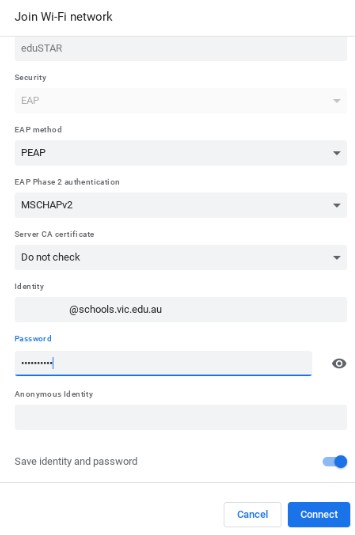
To connect to the eduSTAR Network:
- Select the “eduSTAR” Wi-Fi network.
- Change the “EAP method” to “PEAP” in the drop-down menu.
- Change the “EAP Phase 2 authentication” to “MSCHAPv2” in the drop-down menu.
- Change the “Server CA Certificate” to “Do not check” in the drop-down menu.
- In the “Identify” field, type in your school email address e.g., username@schools.vic.edu.au
- In the “Password” field, type your school email password.
- Leave the “Anonymous Identity” field blank.
- Leave “Save Identity and password” checked and click connect.
Done!